Play a MIDI file into an instrument. Load a Standard MIDI File (.mid) in a rack, connect the player's MIDI output to a synth, and press Play. The notes are timed against the audio itself, so playback stays steady even when the page is busy.
Watch the music
The experimental face fills the screen with the music. Choose a view from the small dock, or tap its current name to open the visual gallery:
- Orbit places note attacks around concentric rings, one for each part.
- Trails traces recent note attacks across pitch and time.
- Harmony connects the sounding pitch classes.
- Bloom unfolds note attacks into luminous petals.
- Drift turns them into flowing currents.
- Ripple sends overlapping rings across the field.
- Spiral winds note attacks around a luminous disc.
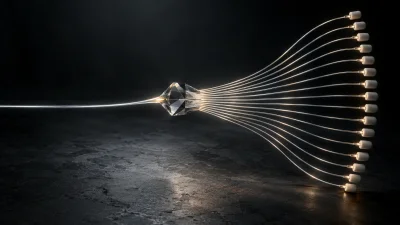
- Threads stretches fine ink curves between opposite edges.
- Prism builds an isometric field of note columns.
- Contour layers note-shaped ridgelines on paper.
- Rain drops glowing streaks by pitch.
- Constellation connects notes into a floating network.
- Gate moves note marks toward a vertical playhead and removes them on arrival.
- Cascade drops notes toward a horizontal playhead.
- Relay connects consecutive attacks into angular paths by part.
- Ribbon sweeps those paths into broad, curved bands.
The gallery shows sixteen frozen previews derived from Afterglow, with two columns on phones and four on wide screens. Tap a tile to return to the live view without restarting the piece. Only the current name stays in the dock.
Open Options to art-direct every look with one shared Colors selection: Grove, Ember, Electric, Glacier, Paper or Mono. The stage, notes, connections, particles and gallery previews use the same palette. Time span selects a 2-, 4- or 8-second window for trails and timeline looks; Line weight changes strokes and marks. Options that do not apply to a look are disabled. For Gate, Cascade, Relay and Ribbon, After crossing chooses immediate Vanish, a short Fade, or a longer Trace. These are note-attack visualizations, rather than sustained piano-roll durations.
Framing fits the composition to portrait 9:16, square or landscape 16:9, with Fill as the default. Hide controls gives a clean stage; tap it or press Escape to bring controls back. These are composition tools for animated MIDI artwork. Video encoding/export and measured audio-driven looks are not implemented in this module yet. Reusable multi-view layouts and ingredient selection are developed in Track Looks, using the shared audio-scope compositor. All design selections use the module's normal saved parameters and do not restart the playing piece.
Two original, twenty-second sketches are included: Afterglow, with warm ninth chords and a wandering melody, and Glasshouse, with a three-against-four pulse. Their four pitched parts are Bass, Chords, Melody and Pulse. Choose the sound in your host; the player itself produces MIDI. Open Options to highlight a part without muting the music, choose another sketch or enable Loop. Musical details and chord names are there when wanted; they stay out of the visual. Imported files use channel groups and a seconds grid, because this prepared-note resource does not retain their tempo map. MIDI percussion note numbers are not harmonic pitches; use a pitched part when interpreting the harmony view.
The phone layout shows one view at a time, with icon playback and fullscreen controls. Bloom and Drift use the shared WebGPU renderer when available and retain the same artwork through a Canvas fallback. Reduced motion removes the rotating sweep, expanding ripples and moving note history. Native and website packaged-release acceptance for this prototype remain unqualified.
Channels and tracks
The player has one MIDI output carrying every note, and each note keeps the MIDI channel it had in the file. Connect it straight to an instrument to hear everything on one sound, or put a MIDI Channel Router after it to send each channel to its own instrument. Note that tracks and channels are not the same thing: one track in a MIDI file can use several channels.